TV Mounts
Full Motion TV Wall Mount for 32-70" TVs up to 99 lbs
In stock — ships same day before 3pm
- Secure checkout
- 30-day returns
- 2-year warranty
- Ships same day before 3pm
Why it's useful
Home Theater · TV Mounting
Full Motion TV Wall Mount — Swivel, Tilt & Extend, 32–70"Pull your TV off the wall, angle it to your seat, and push it back flat when you're done. Dual articulating arms in cold-rolled steel hold up to 99 lbs, with a 3-step install that fits 12" and 16" wood studs.
Straightforward installation
A 3-step process with a drilling template, so there's no guesswork on the wall.
- Included template — mark stud holes accurately before you drill a single hole.
- 3-step process — wall plate, TV bracket, then hang.
- Multiple screw sizes included — hardware is pre-sorted so the right screw for your TV is easy to find.
- Level included — get the wall plate straight before you commit to the studs.
Swivel and tilt to your seat
Full motion adjustment gets the screen pointed at you, not just at the wall.
- Swivel left or right — angle the TV toward your couch, kitchen island, or corner seating.
- Tilt down to cut glare — -12° down tilt reduces reflections from windows and overhead lights.
- +5° upward tilt — fine-tune the angle for mounts placed above eye level.
- Best for front-facing setups — tilt range suits standard living-room angles rather than steep, off-axis mounting.
Pull it out, push it flat
Dual articulating arms extend for viewing and retract for a slim wall profile.
- Extends up to 13.89" — pull the TV off the wall for a closer, more direct view.
- Retracts to 2.59" — push it back flat against the wall when you're not adjusting the angle.
- Dual articulating arms — move independently for smooth extension without binding.
- Space-saving profile — sits close to the wall in the retracted position, out of the way of foot traffic.
Cold-rolled steel, built to hold
Rated for up to 99 lbs, with the load-bearing structure to back it up.
- Cold-rolled steel construction — a rigid frame that resists flex under a heavy screen.
- Holds up to 99 lbs — rated for large 65–70" TVs, mounted securely into the studs.
- Reinforced load-bearing arms — designed to keep the TV steady through repeated swivel and tilt use.
- Anchored to studs, not drywall — install into 12" or 16" wood studs, concrete, or brick for full-rated strength.
Fits most 32–70" TVs
Wide VESA range and stud spacing cover most flat-screen setups.
- VESA 75×75mm to 400×400mm — covers the mounting-hole pattern on most 32–70" TVs.
- Fits 12" and 16" wood studs — also mounts to concrete or brick with the included hardware.
- Confirm before you buy — check your TV's size, weight, and VESA pattern against the mount's range.
- Works with popular models — fits many mainstream 65" sets without modification.
What's in the box
Everything needed to go from wall to mounted TV in one box.
- Wall mount bracket — dual articulating arms, pre-assembled where possible.
- Drilling template — mark your stud holes accurately before installing.
- Bubble level — confirm the wall plate is straight before you drill.
- Mounting hardware & multiple screw sizes — sorted for different TV back-panel thread sizes.
Specifications
- TV size range
- 32" – 70"
- Weight capacity
- Up to 99 lbs
- VESA compatibility
- 75×75mm – 400×400mm
- Material
- Cold-rolled steel
- Arm type
- Dual articulating (full motion)
- Extension
- 13.89" extended, 2.59" retracted
- Tilt
- -12° / +5°
- Swivel
- Left / right, adjustable to seat position
- Wall mounting
- 12" or 16" wood studs, concrete, or brick
- In the box
- Mount bracket, drilling template, bubble level, mounting hardware, multiple screw sizes
Install & use
Before you drill: confirm your TV's weight, screen size, and VESA hole pattern against the specs above. Use the included template to mark stud locations, then check with a level before securing the wall plate.
Stud-mounted only: this mount is rated for wood studs, concrete, or brick — not drywall alone. For concrete or brick, use appropriate anchors.
Tilt range note: the -12°/+5° tilt suits standard front-facing viewing angles rather than steep overhead or off-axis mounting positions.
Get your TV off the wall — and angled right.
Swivel it, tilt it, push it flat when you're done. A sturdy steel mount that installs in one afternoon.
Fit & compatibility
Not sure if this fits your setup? Send us your TV model before ordering.
Specifications
Full specification sheet coming soon.
What's in the box
Product, mounting/connection hardware, and quick-start guide as applicable.
Setup and care
Wipe with a dry microfibre cloth. Detailed setup guidance for this product will be published here.
Shipping and returns
Ships same day on orders placed before 3pm. Free shipping worldwide. Return any unused item within 30 days — see our shipping policy for full details.
Warranty
Covered by a 2-year warranty against manufacturing defects. See the warranty page for what's included.
Full Motion TV Wall Mount for 32-70" TVs up to 99 lbs
$99.00£75.99€88.99CA$141.99
Pairs with
Complete your setup
TV Mounts
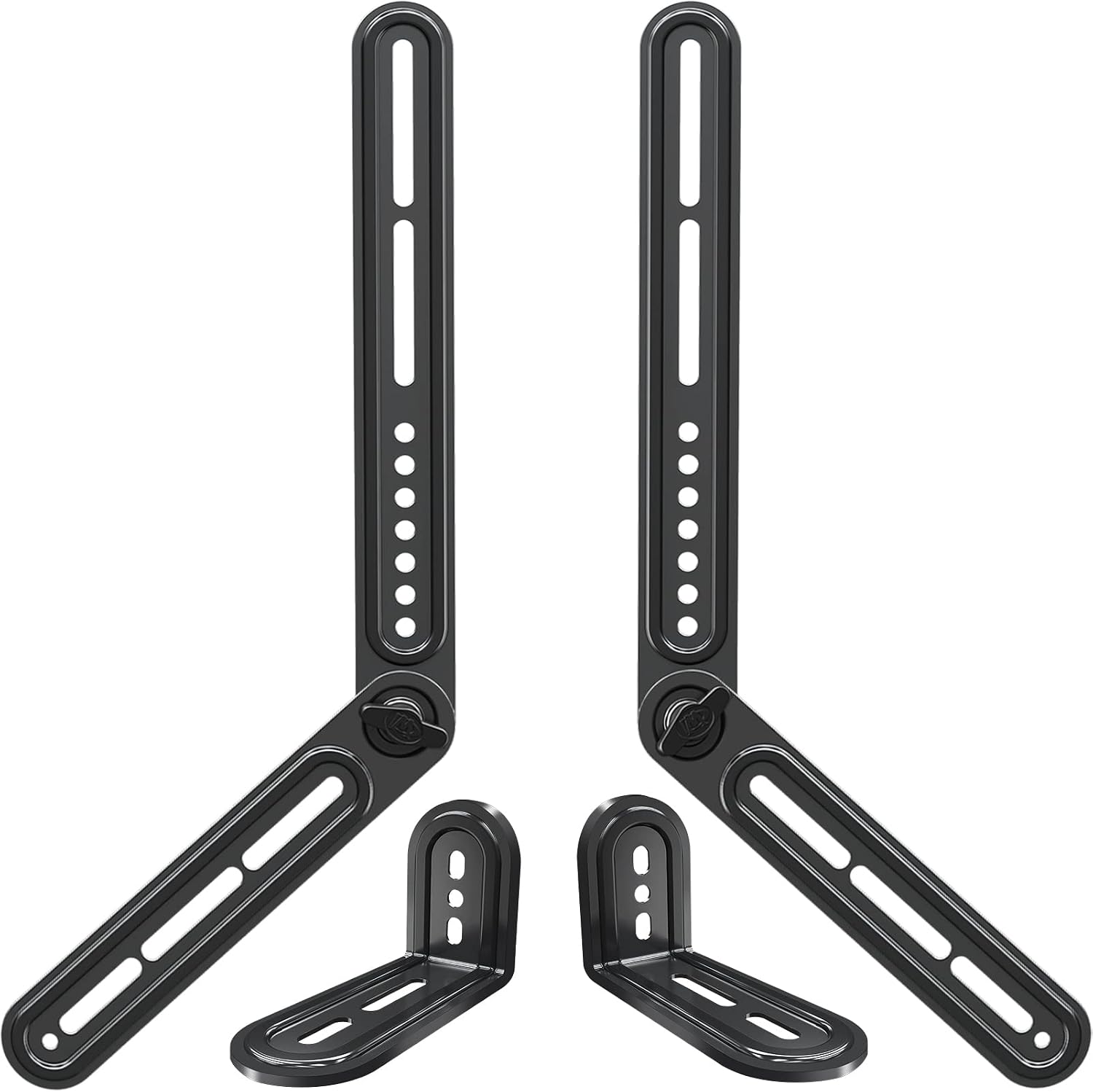
Universal Soundbar Mount Bracket — Up to 15 lb
Mount your soundbar directly above or below the television for a cleaner entertainment setup that moves with the screen. Flexible mounting Supports compatible soundbars weighing up to 15 lb (6.8 kg) Works with many fixed, tilting, and full-motion TV mounts Supports TV VESA patterns up to 600 × 400 mm Detachable extension plates provide multiple assembly positions Included Soundbar mounting bracket, extension plates, L-shaped mounting hardware, installation hardware, and instructions. Compatibility notice: Confirm the soundbar weight, mounting-hole type and spacing, TV VESA pattern, and available clearance before ordering. This bracket may not fit every soundbar or televisions over 83 inches.
TV Mounts
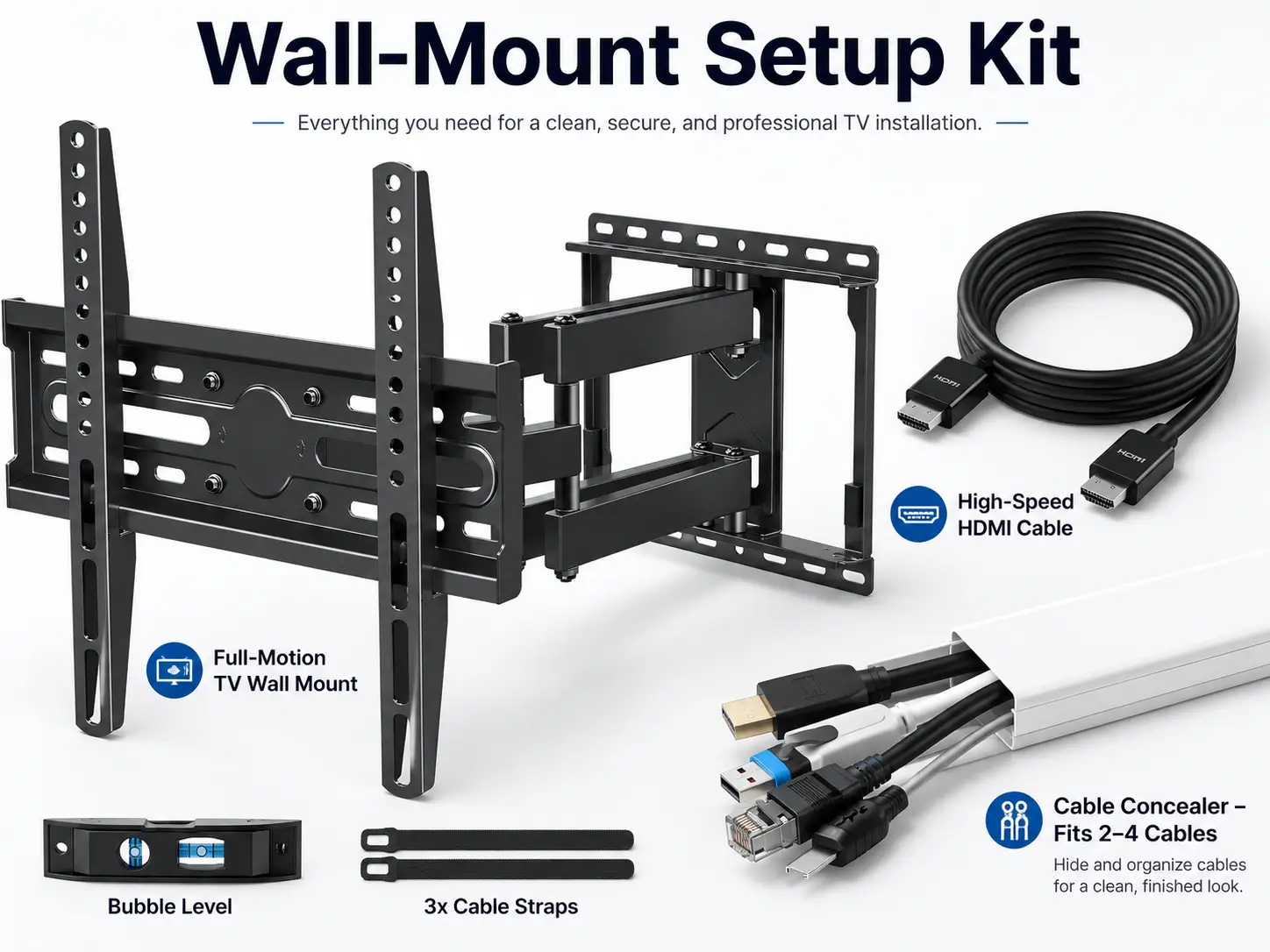
Wall-Mount Setup Kit
Ref BND-01 3-Piece Bundle Mount + Cable + Raceway 32–70" TVs Home Theater · Complete Setup Bundle TV Mount + HDMI 2.1 Cable + Cable Raceway Kit One order gets your TV on the wall, connected at full 4K/8K speed, and wired clean with no cords hanging down the drywall. A full motion mount, a certified 48Gbps HDMI 2.1 cable, and a paintable raceway kit to hide the run — everything you need for a finished, showroom-clean install. 01 Full Motion TV Mount + 02 HDMI 2.1 Cable, 48Gbps + 03 Paintable Cable Raceway Complete Bundle 00 Why buy it as one kit Three parts that are normally bought separately — and normally forgotten separately, too. This bundle solves the whole job in one checkout. Mount the TV Full motion Swivel and tilt it to your seat, up to 99 lbs. Connect it right 48Gbps HDMI 2.1 Certified for 4K@120Hz and 8K@60Hz — no bottleneck. Hide the cords Paintable raceway 290" of channel to route and disappear the cable run. Finished, cable-free install Setup Piece 01 · TV Mount 01 Full motion mount, 32–70" Swivel, tilt, and pull the TV toward you — then push it flat when you're done. Fits 32–70" TVs up to 99 lbs — covers the vast majority of living-room and bedroom TVs. Max VESA 400×400mm — matches the mounting-hole pattern on most mid-to-large flat screens. 6 articulating arms — robot-welded steel construction for a rigid, non-flexing hold. Swivel left or right — angle the screen to your couch, kitchen island, or corner seating. 6-arm full motion design Motion Piece 01 · TV Mount 02 Pull it out, tilt down the glare Extension and tilt working together for a genuinely adjustable viewing angle. Extends to 17.5" — pull the TV well off the wall for a closer view. Retracts to 3.4" — push it back flat against the wall when not in use. Tilts up 5° / down 15° — angle downward to cut glare from windows and overhead lights. ±3° post-install leveling — fine-tune the TV level after it's already on the wall. Extend 17.5" · retract 3.4" Reach Piece 02 · HDMI 2.1 Cable 03 48Gbps HDMI 2.1, certified The cable that actually keeps up with a modern TV, console, or streaming box — not a cable that quietly caps your picture. 48Gbps bandwidth — HDMI 2.1 certified, well beyond the 18Gbps ceiling of standard HDMI 2.0 cables. Supports 4K@120Hz and 8K@60Hz — handles the highest resolutions and refresh rates current TVs and consoles output. Dolby Vision HDR — passes the full HDR signal for accurate color, contrast, and brightness. Double-layer shielding — protects signal integrity and the cable itself from everyday wear. 48Gbps HDMI 2.1 connector Cable Piece 02 · HDMI 2.1 Cable 04 Built for gaming and streaming 6.6ft is the right length for most wall-mount setups, and it's rated for the devices people are actually plugging in. 6.6ft / 2M length — reaches comfortably from a wall-mounted TV down to a console or streaming box. PS5 & Xbox Series X ready — delivers the full bandwidth modern consoles need for high-res, high-refresh gaming. Works with Apple TV 4K & streaming devices — passes 4K HDR content without compression artifacts. Motion-blur reduction — high refresh-rate support keeps fast motion clean and sharp. 4K@120Hz · 8K@60Hz Spec Piece 03 · Cable Raceway 05 Hide the run, keep it paintable 290" of channel — enough to route a wall-mounted TV's cables from the mount down to an outlet or media console, out of sight. 290" total length — 20 pieces at 14.6" each, enough to plan a full vertical or horizontal run. Self-adhesive install — peel and stick to the wall, no drilling required for the channel itself. Paintable white PVC — paint it to match your wall color so it disappears completely. Snap-on cover — tuck cables inside and close the channel for a clean, finished line. Paintable, self-adhesive raceway Raceway Piece 03 · Cable Raceway 06 20 pieces, cut to plan your route Pre-cut lengths mean less measuring and cutting, more sticking and done. 20× 14.6" sections — combine pieces to reach from the mount to your outlet or console. Corner & connector pieces included — route around corners without an awkward gap. Trim to fit — cut individual sections shorter for tight runs or odd wall layouts. Works with any cable — power cords, HDMI, Ethernet, or speaker wire all fit inside the channel. 20-piece raceway kit Kit 07 What's in the bundle Everything to go from bare wall to a finished, wired TV setup in one order. Mounting Dream full motion TV mount — bracket, drilling template, hardware in pre-labeled bags, Allen key. Belkin HDMI 2.1 cable, 6.6ft — one certified 48Gbps cable ready to connect your source device. YesBes 290" cable raceway kit — 20 channel pieces, connectors, and adhesive backing. Everything needed for a clean install — no separate trips or add-on purchases required. Complete bundle contents Included 08 In your space The result: a wall-mounted TV that looks like it was professionally installed. Living room installation Space Mount, connect, conceal Steps 09 Specifications 01 · TV Wall Mount — Mounting Dream MD2380 TV size range 32" – 70" Weight capacity Up to 99 lbs Max VESA 400×400mm Arms 6-arm full motion, robot-welded steel Extension 17.5" extended, 3.4" retracted Tilt +5° up / -15° down Leveling ±3° post-installation Wall mounting 16" wood studs (not for drywall alone; concrete anchors available on request) 02 · HDMI 2.1 Cable — Belkin Ultra HD Length 6.6 ft / 2M Bandwidth 48 Gbps, HDMI 2.1 certified Resolution support 4K@120Hz, 8K@60Hz HDR Dolby Vision Shielding Double-layer Compatibility PS5, PS4, Xbox Series X, Apple TV 4K, laptops, PCs 03 · Cable Raceway — YesBes 290" Kit Total length 290" (20 pieces × 14.6") Channel size 0.95" W × 0.55" H Material Paintable PVC Install Self-adhesive, peel and stick Color White (paintable to match any wall) 10 Install & use Suggested order: mount the bracket into wood studs using the included template, hang the TV, connect the HDMI 2.1 cable to your source device, then route the cable through the raceway from the mount down to your outlet or console. Studs, not drywall: the mount is rated for 16" wood studs; drywall alone will not support the rated weight. Use concrete anchors (available on request) for masonry walls. Raceway finish: the channel is paintable — for the most seamless look, paint it to match your wall color after installation and before adding the cables. One order. A finished wall. Mount the TV, connect it at full 4K/8K speed, and hide every cable — all three pieces, one checkout. Add bundle to cart
Desk & Living Room
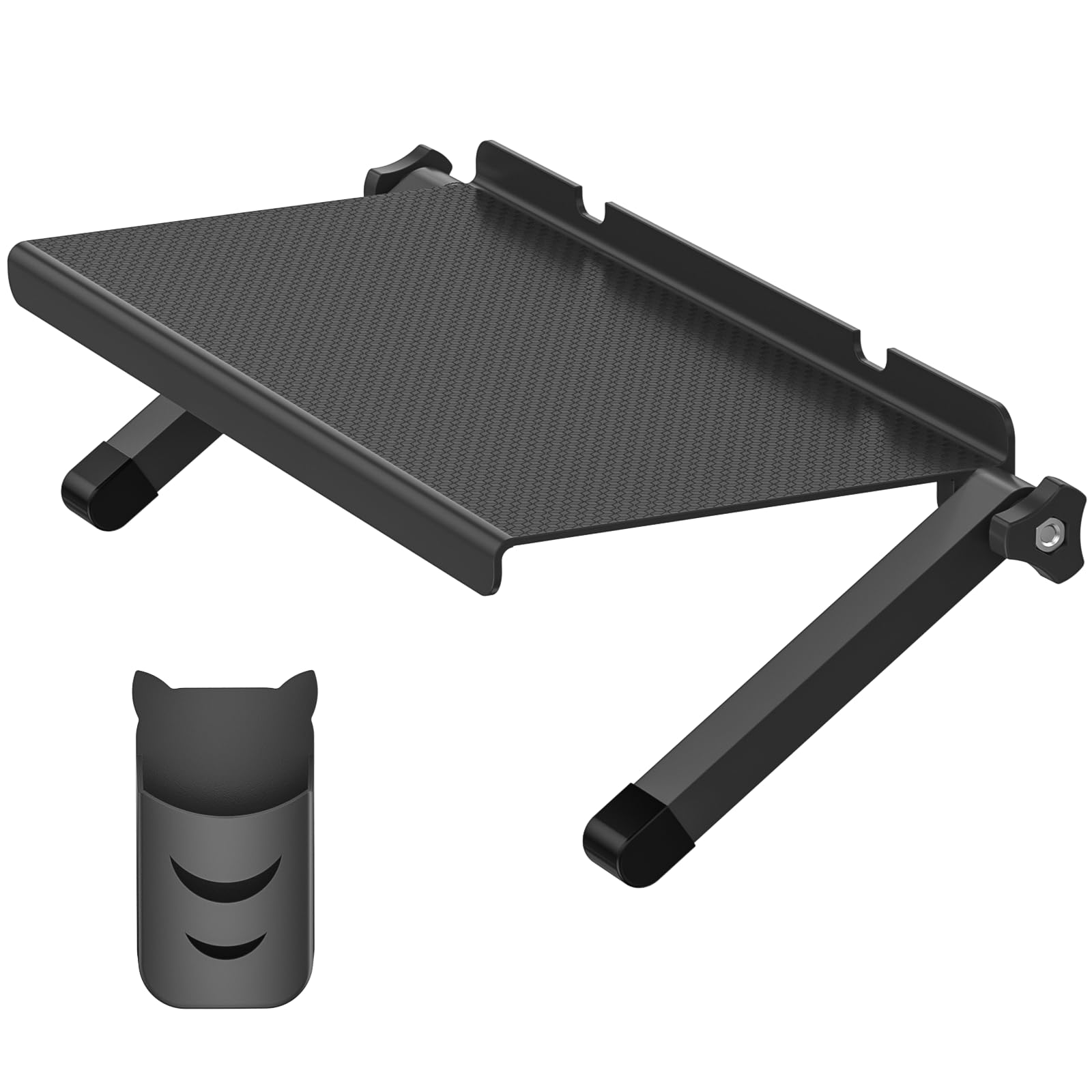
13-Inch TV Top Shelf with Remote Holder
Add convenient storage above a compatible television without drilling the wall or occupying space on the media console. Wide adjustable platform Approximately 13-inch-wide top platform Adjustable support legs Textured, anti-slip shelf surface Separate remote-control holder Multiple uses Suitable for compatible streaming devices, routers, media boxes, remotes, small game accessories, and other lightweight items. Compatibility notice: TV thickness, rear-panel angle, bezel design, ventilation, and shelf load affect fit. Confirm the television provides a stable mounting surface before use. Devices and remotes are not included.
 Save 59%
Streaming Devices
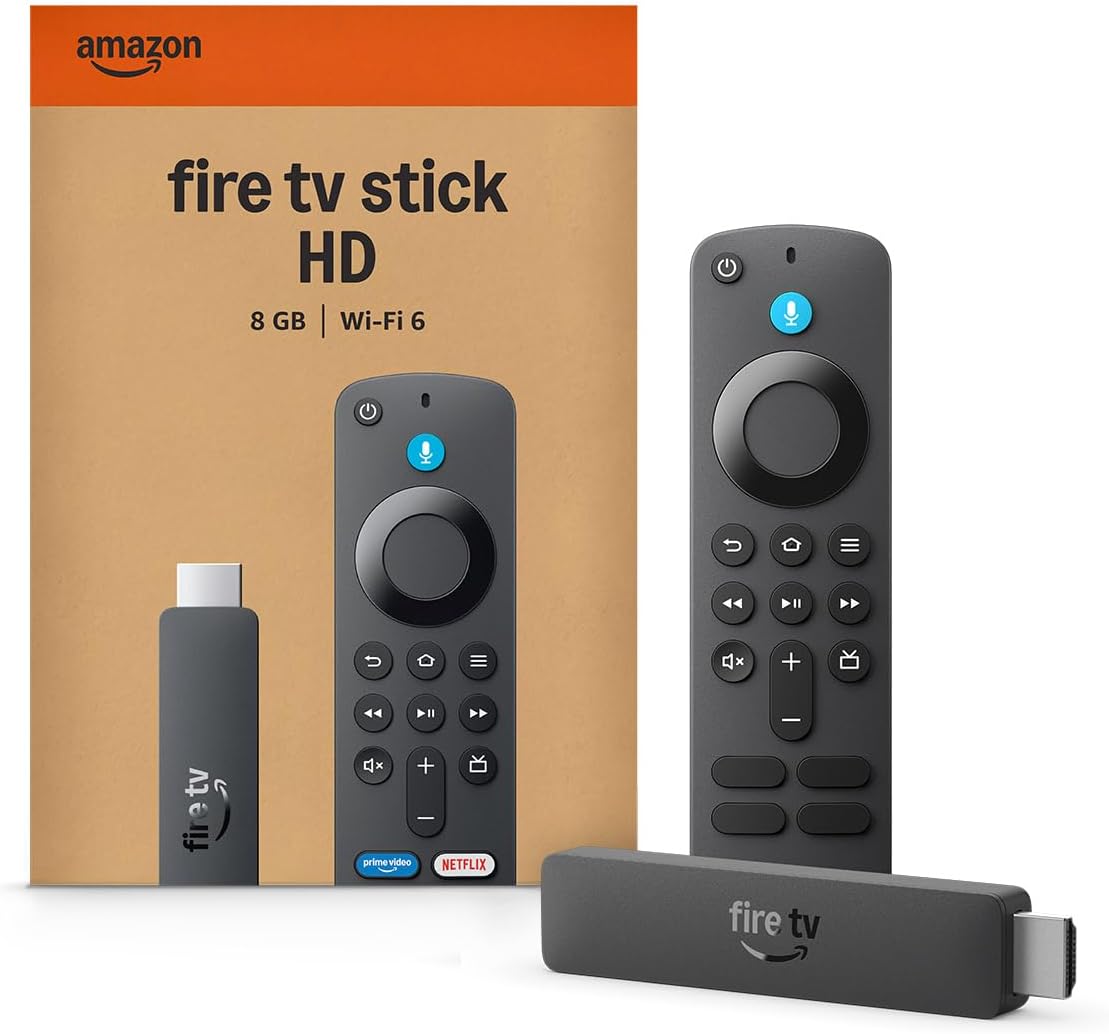
Firestore, Find it fast. watch it now
fire-store.SHOP Upgrade any TV into a smart streaming hub — in minutes. The Fire TV Stick HD is Amazon's slimmest, fastest HD streaming stick yet — about 30% slimmer than the previous generation and powered directly by your TV's USB port. No wall adapter, no cable clutter, nothing standing between you and your favorite shows. Design & Portability Ultra-thin profile (approx. 3.6 × 0.8 in) — fits tight HDMI ports without an extender Direct Power via USB-C — runs straight off your TV's USB port with the included cable. No wall adapter needed Travel-ready — at roughly 36 g, slip it in a bag and stream in hotel rooms or on the go Performance & Picture Over 30% faster than the previous HD model — quad-core 1.7 GHz CPU for snappy app loads and smooth navigation Crisp Full HD 1080p with HDR10, HDR10+ and HLG for richer color and contrast on compatible TVs Wi-Fi 6 + Bluetooth 5.3 — stable, buffer-free streaming even on busy home networks Dolby audio pass-through via HDMI for immersive sound with compatible systems Smart Features & Content Alexa Voice Remote with power, volume and mute buttons — control your TV and soundbar with one remote New Fire TV Experience with Alexa+ — cleaner navigation, universal search across your subscriptions, and pin up to 20 favorite apps to your home screen* Thousands of apps — Prime Video, Netflix, YouTube, Disney+, plus free & live TV channels Smart home control — ask Alexa to find what to watch or control compatible lights and devices Specifications Resolution 1080p Full HD (up to 60 fps) HDR HDR10, HDR10+, HLG Processor Quad-core 1.7 GHz Storage 8 GB Connectivity Wi-Fi 6 (dual-band), Bluetooth 5.3 + BLE, HDMI Power USB-C — Direct Power from TV USB port (cable included) Dimensions Approx. 91.5 × 21.1 × 14.5 mm Weight Approx. 36 g In the box Fire TV Stick HD, Alexa Voice Remote, USB power cable, 2× AAA batteries Setup & Care Plug the stick into your TV's HDMI port, connect the USB-C cable to your TV's USB port, and follow the on-screen setup — most users are streaming in under five minutes. If the device ever becomes unresponsive, unplug it for 60 seconds to refresh it. Keep it away from heat sources and avoid forcing it into recessed HDMI ports. Ready to stream smarter? Skip the smart TV upgrade — get instant access to everything you love to watch for a fraction of the price. *Separate subscriptions may be required for some apps and services. Full Alexa+ access is included with Prime membership; a paid plan applies for non-Prime customers. Feature and content availability may vary by region. HDR playback requires a compatible HDR TV. This device supports apps from the Amazon Appstore only. Sold by fire-store.tv